> ## Documentation Index
> Fetch the complete documentation index at: https://university.triggr-app.com/llms.txt
> Use this file to discover all available pages before exploring further.
# API reference
> Use Triggr's public API to list clients and forms, run Core workflows, follow executions, act on approvals and receive webhooks.
Use the public API from your own portal or tools to list clients, forms and workflows, run Core forms, follow executions, act on approvals and receive events by webhook. Every endpoint is in the sidebar, with a playground to try it.
| | |
| - | - |
| Base URL | `https://api.triggr-app.com` |
| Authentication | `Authorization: Bearer tpk_…` |
| Format | JSON in and out |
| Spec | [OpenAPI 3.0](https://api.triggr-app.com/api/v1/openapi.json) |
## Get a key
Create a key in Triggr Core under **Settings > API** or in Studio under **Settings > API Keys**; both manage the same keys, and the key is shown once. See [API and webhooks](/core/manage/api-and-webhooks) for rolling and revoking keys.
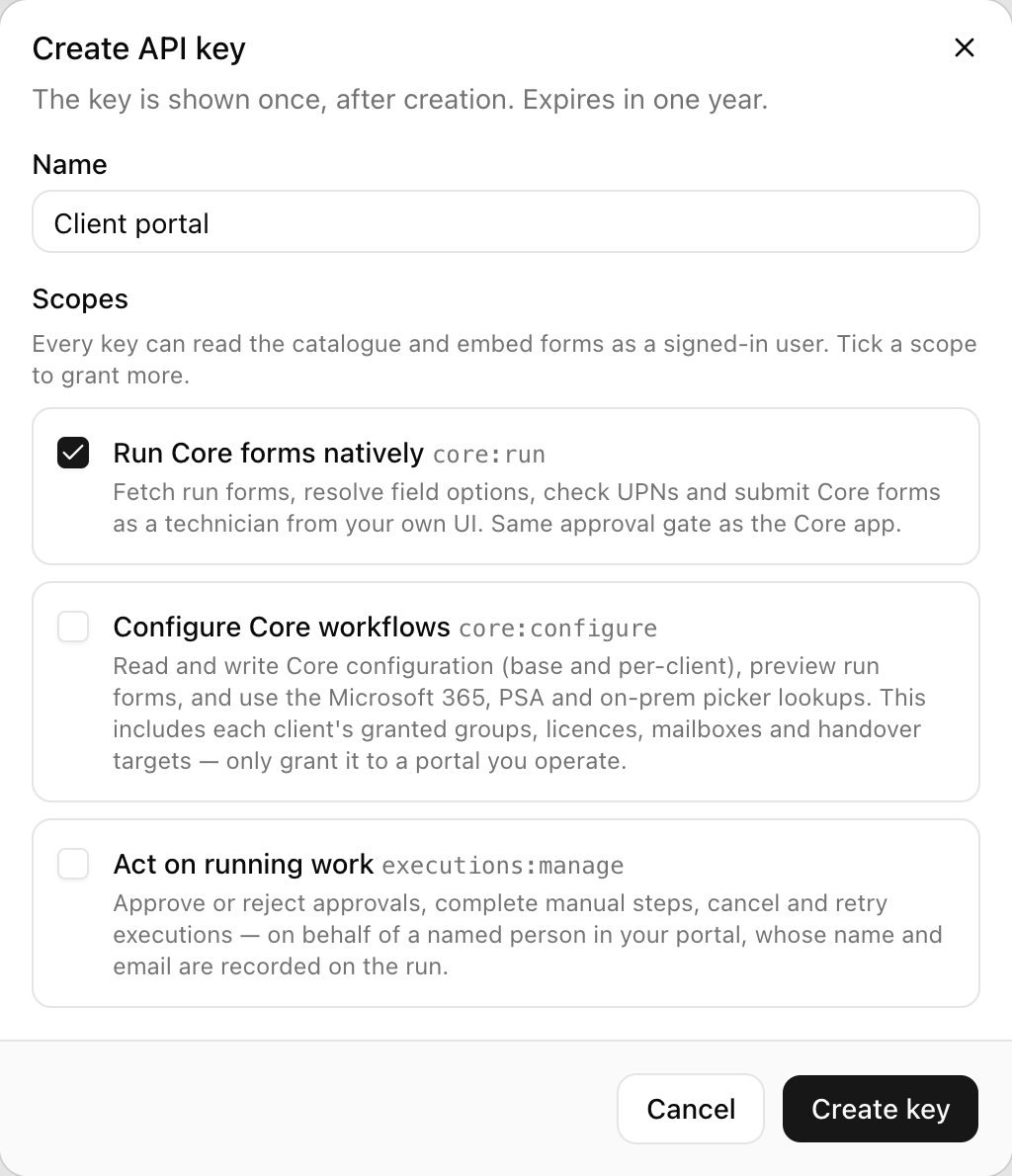 Every key can read the catalogue and start form sessions. Tick a scope when you create the key if you need it; each endpoint's page says which scope it needs.
| Scope | Allows |
| - | - |
| `core:run` | Running Core forms from your own app, with the same approvals as Core. |
| `core:configure` | Reading and changing Core workflow configuration, including each client's groups, licences and mailboxes. Only give it to a portal you run. |
| `executions:manage` | Approving or rejecting approvals, completing manual steps, and cancelling or retrying executions, on behalf of a named person. |
## Make a request
```bash theme={null}
curl https://api.triggr-app.com/api/v1/clients \
-H "Authorization: Bearer $TRIGGR_API_KEY"
```
`GET /api/v1/me` returns the organisation the key belongs to, so it's a quick way to check a key works.
## Limits and conventions
* Rate limits: 600 reads and 60 writes a minute per key, and 120 form-session starts a minute. Responses carry `X-RateLimit-Limit` and `X-RateLimit-Remaining`; a `429` carries `Retry-After`.
* Paging: lists take `limit` (default 50, up to 100) and `offset`, and return `total` and `hasMore`. Executions and Core requests also take `since` (an RFC 3339 time).
* Retrying safely: endpoints that start or decide something accept an optional `Idempotency-Key` header, so a retried request isn't carried out twice.
## Webhooks
Register a webhook to be told when executions finish, approvals are needed and more. See [Add a webhook](/core/manage/api-and-webhooks#add-a-webhook) for events, signatures and retries.
## Related
* [API keys and webhooks in Studio](/studio/settings/api-and-webhooks)
* [Connect AI tools over MCP](/studio/mcp): for Claude Code, Codex and Cursor rather than your own code.
This documentation is built and hosted on [Mintlify](https://mintlify.com), a developer documentation platform.
Every key can read the catalogue and start form sessions. Tick a scope when you create the key if you need it; each endpoint's page says which scope it needs.
| Scope | Allows |
| - | - |
| `core:run` | Running Core forms from your own app, with the same approvals as Core. |
| `core:configure` | Reading and changing Core workflow configuration, including each client's groups, licences and mailboxes. Only give it to a portal you run. |
| `executions:manage` | Approving or rejecting approvals, completing manual steps, and cancelling or retrying executions, on behalf of a named person. |
## Make a request
```bash theme={null}
curl https://api.triggr-app.com/api/v1/clients \
-H "Authorization: Bearer $TRIGGR_API_KEY"
```
`GET /api/v1/me` returns the organisation the key belongs to, so it's a quick way to check a key works.
## Limits and conventions
* Rate limits: 600 reads and 60 writes a minute per key, and 120 form-session starts a minute. Responses carry `X-RateLimit-Limit` and `X-RateLimit-Remaining`; a `429` carries `Retry-After`.
* Paging: lists take `limit` (default 50, up to 100) and `offset`, and return `total` and `hasMore`. Executions and Core requests also take `since` (an RFC 3339 time).
* Retrying safely: endpoints that start or decide something accept an optional `Idempotency-Key` header, so a retried request isn't carried out twice.
## Webhooks
Register a webhook to be told when executions finish, approvals are needed and more. See [Add a webhook](/core/manage/api-and-webhooks#add-a-webhook) for events, signatures and retries.
## Related
* [API keys and webhooks in Studio](/studio/settings/api-and-webhooks)
* [Connect AI tools over MCP](/studio/mcp): for Claude Code, Codex and Cursor rather than your own code.
This documentation is built and hosted on [Mintlify](https://mintlify.com), a developer documentation platform.