> ## Documentation Index
> Fetch the complete documentation index at: https://university.triggr-app.com/llms.txt
> Use this file to discover all available pages before exploring further.
# Generate agent credentials
> Create the client ID and secret that link a desktop agent to one Triggr client.
Each agent signs in with a client ID and secret created for the Triggr client whose network it runs in.
Go to Clients and click the client. Its Environment can't be Cloud Only.
Under Agent, click **Generate agent credentials**.
Core shows the secret only once; click Done — hide secret when you've copied it. Regenerate replaces it and revokes the old one.
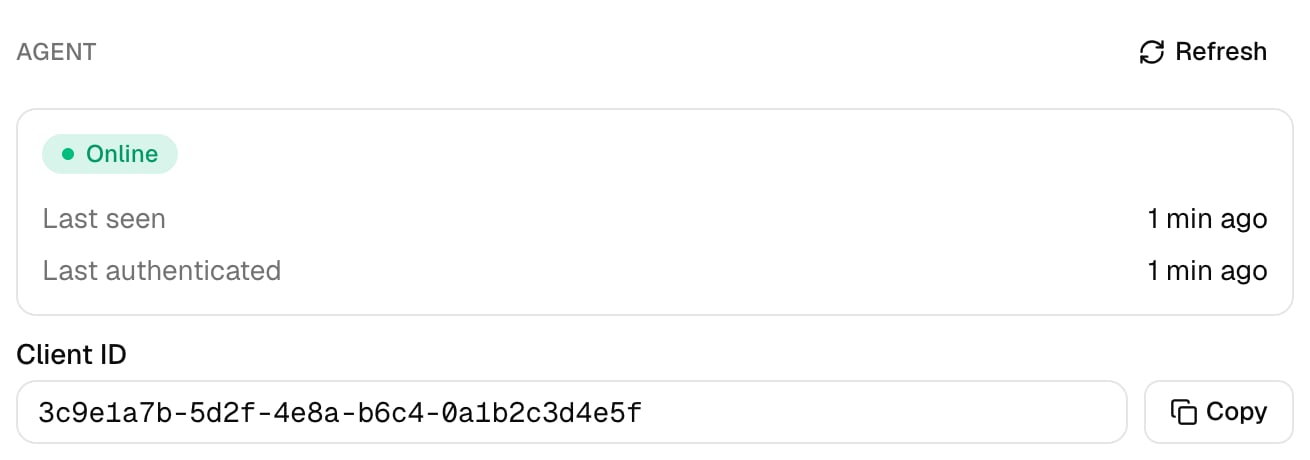 In Clients, open the client, click Agent Credentials, then click **New Client**.
 Enter the name of the machine you're installing the agent on, such as `Client Domain Controller`, and click Create Client. Create one for each machine.
 Click **New Secret** in the new row, then Create Secret.
 Copy the Client ID and Secret. Studio shows the secret only once.
Next: [install the desktop agent](/desktop-agent/install).
## FAQ
In Studio, click New Secret on the machine's row and use the new one; the old one keeps working until you click Revoke Secret. In Core, click Regenerate.
Create a client for each machine instead. Agent Summary on the client's page then shows each one's Status and Last Seen separately.
This documentation is built and hosted on [Mintlify](https://mintlify.com), a developer documentation platform.
Copy the Client ID and Secret. Studio shows the secret only once.
Next: [install the desktop agent](/desktop-agent/install).
## FAQ
In Studio, click New Secret on the machine's row and use the new one; the old one keeps working until you click Revoke Secret. In Core, click Regenerate.
Create a client for each machine instead. Agent Summary on the client's page then shows each one's Status and Last Seen separately.
This documentation is built and hosted on [Mintlify](https://mintlify.com), a developer documentation platform.