> ## Documentation Index
> Fetch the complete documentation index at: https://university.triggr-app.com/llms.txt
> Use this file to discover all available pages before exploring further.
# KnowBe4
> Connect each client's KnowBe4 security awareness training account to Triggr with a KnowBe4 Reporting API key.
Triggr reads KnowBe4 account details, risk scores, users, groups, phishing campaigns and tests, and training campaigns, enrolments and purchases. It doesn't change anything in KnowBe4.
## Set up KnowBe4
Do this in each client's KnowBe4 console. The account needs a plan that includes the Reporting API (Platinum, Diamond, SAT Foundations or SAT Advanced). From a partner account, open a client's console with **View as Admin** on the Accounts tab.
Click your email address at the top right, select Account Settings, go to **Account Integrations > API** and turn on Enable Report API Access.
Open the Reporting API subtab, click **Create New API Token**, name it `Triggr` with Status enabled, and click Create Token.
Click the token to copy it, then click OK. KnowBe4 doesn't show it again.
Use a Reporting API token: User Event API and Graph API keys don't work, and each key returns data only from its own account. See KnowBe4's [Reporting API Overview](https://support.knowbe4.com/hc/en-us/articles/115016090908-Reporting-API-Overview).
## Connect it in Triggr
KnowBe4 is configured per client. A workflow that runs for a client never falls back to the Base Configuration, which only workflows that run without a client use.
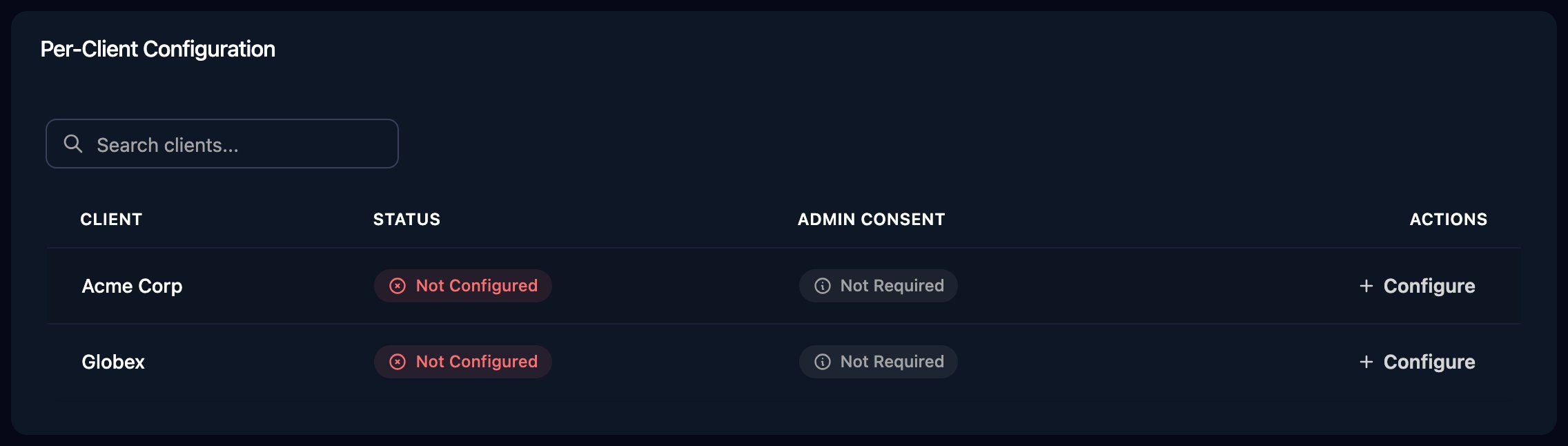
Go to **Integrations > KnowBe4** and click Configure on the client's row in the Per-Client Configuration card (or on the Base Configuration card for your own account).
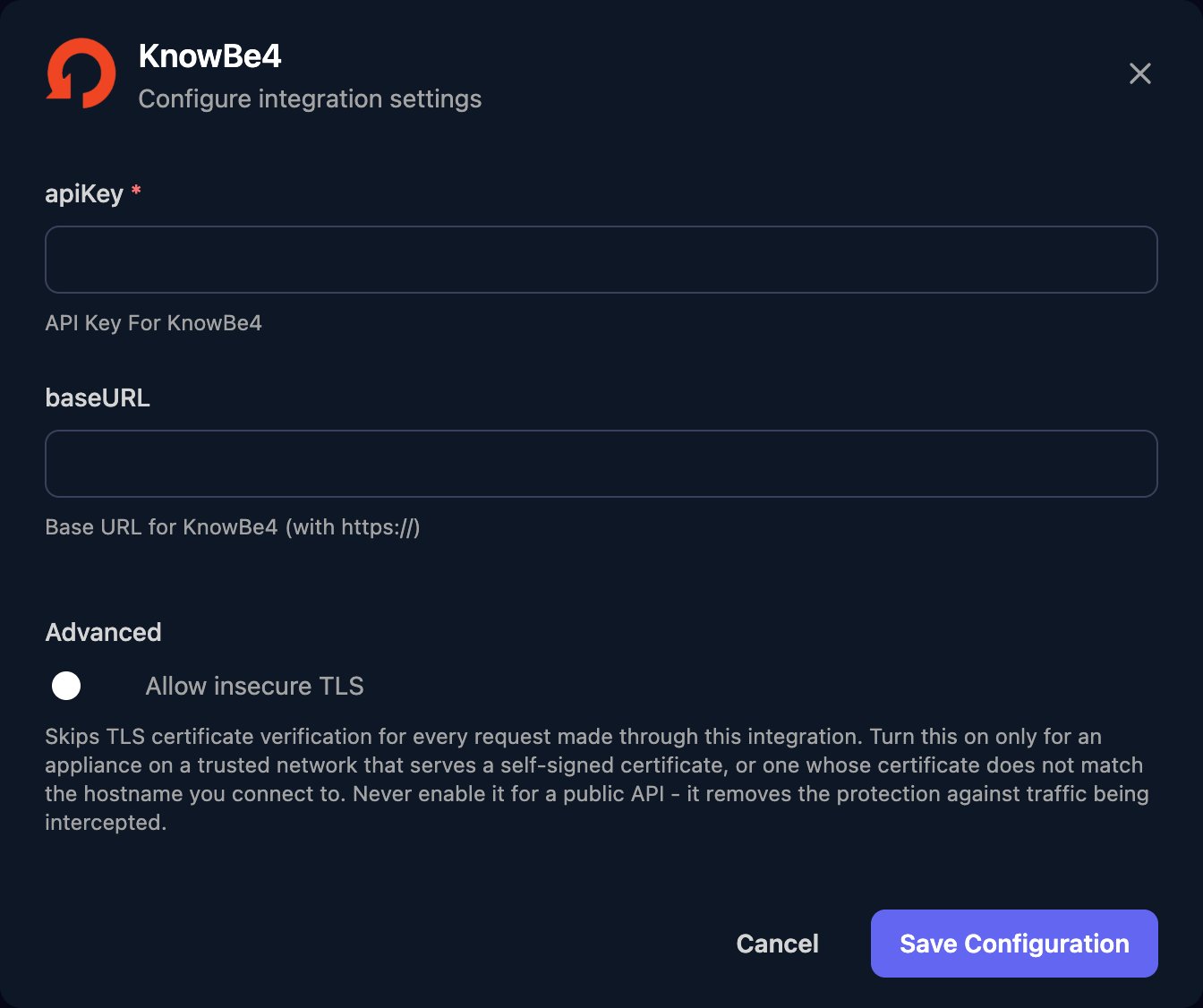
 Paste the token into apiKey, enter the baseURL for the account's server from the table below and click Save Configuration. Always fill in baseURL, even though it isn't marked as required, and fill in both fields for every client.
 | You sign in to | baseURL |
| - | - |
| `training.knowbe4.com` | `https://us.api.knowbe4.com` |
| `eu.knowbe4.com` | `https://eu.api.knowbe4.com` |
| `ca.knowbe4.com` | `https://ca.api.knowbe4.com` |
| `uk.knowbe4.com` | `https://uk.api.knowbe4.com` |
| `de.knowbe4.com` | `https://de.api.knowbe4.com` |
## Troubleshooting
Configure the client on the Per-Client Configuration card, then run the workflow again.
Check baseURL is filled in, is a Reporting API address from the table, and ends at `.com` with no `/v1`.
Check it's a full Reporting API token, baseURL matches the account's server, and Enable Report API Access is still on. Tokens expire after five years; if the token is lost or expired, create a new one and paste it into apiKey with Edit on the row.
The client's row holds a token from another KnowBe4 account. Create one in the right client's console and replace apiKey on that row.
The KnowBe4 account has chosen to anonymise its user data, which the Reporting API then leaves out. It's a setting in that KnowBe4 account.
KnowBe4 allows 2,000 requests a day plus one per licensed user, at most four a second and 50 a minute. Spread the work out, or fetch up to 500 results a page with `per_page`.
This documentation is built and hosted on [Mintlify](https://mintlify.com), a developer documentation platform.
| You sign in to | baseURL |
| - | - |
| `training.knowbe4.com` | `https://us.api.knowbe4.com` |
| `eu.knowbe4.com` | `https://eu.api.knowbe4.com` |
| `ca.knowbe4.com` | `https://ca.api.knowbe4.com` |
| `uk.knowbe4.com` | `https://uk.api.knowbe4.com` |
| `de.knowbe4.com` | `https://de.api.knowbe4.com` |
## Troubleshooting
Configure the client on the Per-Client Configuration card, then run the workflow again.
Check baseURL is filled in, is a Reporting API address from the table, and ends at `.com` with no `/v1`.
Check it's a full Reporting API token, baseURL matches the account's server, and Enable Report API Access is still on. Tokens expire after five years; if the token is lost or expired, create a new one and paste it into apiKey with Edit on the row.
The client's row holds a token from another KnowBe4 account. Create one in the right client's console and replace apiKey on that row.
The KnowBe4 account has chosen to anonymise its user data, which the Reporting API then leaves out. It's a setting in that KnowBe4 account.
KnowBe4 allows 2,000 requests a day plus one per licensed user, at most four a second and 50 a minute. Spread the work out, or fetch up to 500 results a page with `per_page`.
This documentation is built and hosted on [Mintlify](https://mintlify.com), a developer documentation platform.