> ## Documentation Index
> Fetch the complete documentation index at: https://university.triggr-app.com/llms.txt
> Use this file to discover all available pages before exploring further.
# Introduction
> What Triggr Studio is, how it differs from Triggr Core, and where to start.
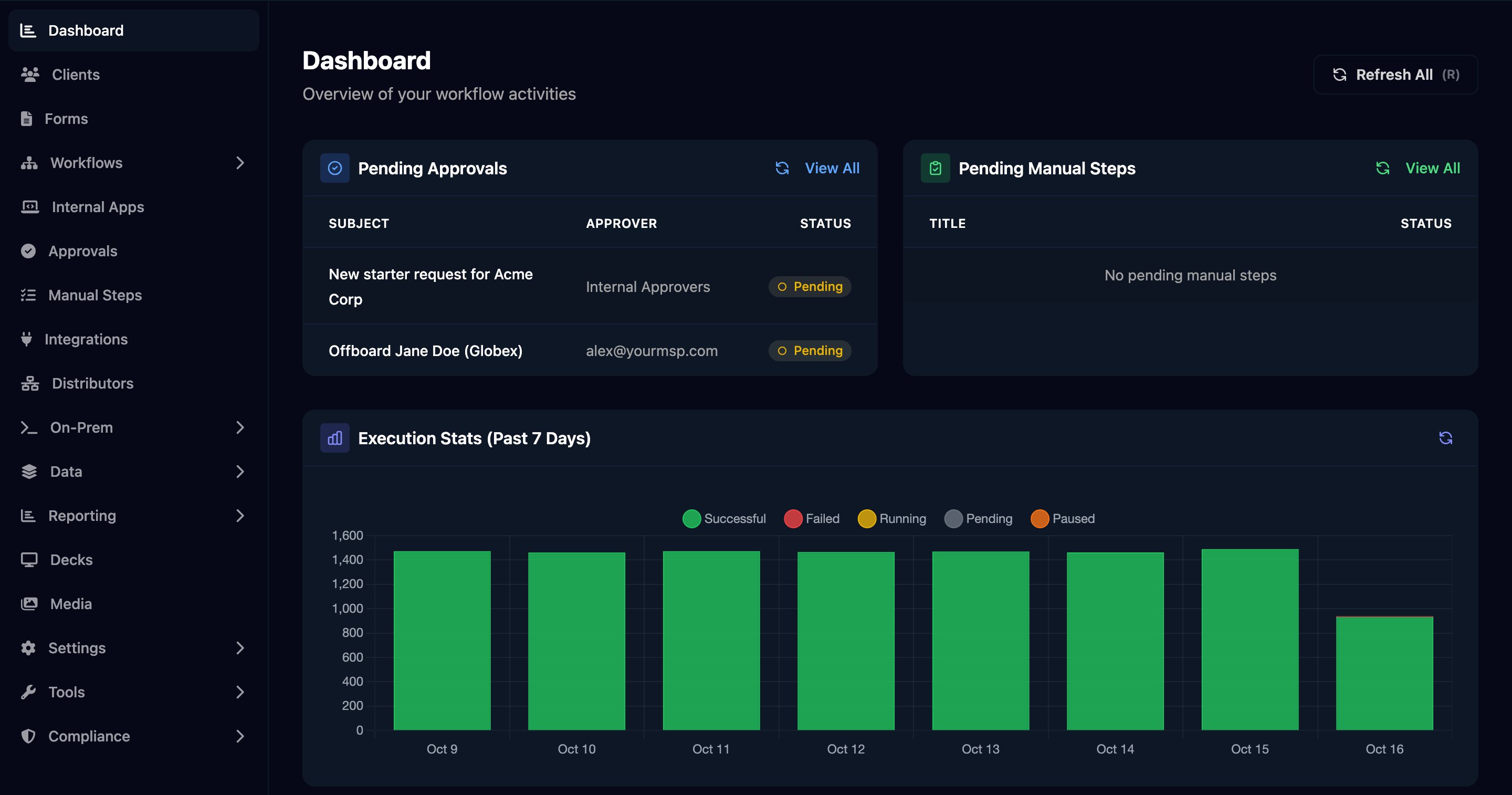
Triggr Studio, at [app.triggr-app.com](https://app.triggr-app.com), is where you build your own automations: forms, workflows across every tool you connect (including clients' on-premises networks) and internal apps. [Triggr Core](/core/introduction) is the ready-made Microsoft 365 catalogue; Studio covers everything beyond it. Both share one sign-in, and the same clients and team.
 ## Two ways to use Studio
Your team builds and maintains its own forms, workflows and apps, using these guides.
Our team builds and maintains workflows for you, with ad hoc build credits or a retainer (typically one or two workflows a month).
Most MSPs choose done for you for Studio: our team has built automations for many MSPs and can advise on best practice. Ask your Triggr account manager.
Setting up a new organisation? Start with the [Go-live checklist](/studio/go-live-checklist).
## Build
Work through these in order. Each introduction builds a working example in a few minutes.
Collect requests from your team or clients, with Microsoft or Google sign-in.
Run steps across your tools when a form is submitted, on a schedule or from a webhook.
Build pages Triggr hosts that start workflows and show their results.
## Find your way around
| Sidebar | Guide |
| - | - |
| Clients | [Clients and variables](/studio/clients/clients-and-variables) |
| Forms | [Forms](/studio/forms/introduction) |
| Workflows, Executions | [Workflows](/studio/workflows/introduction), [Debug a failed run](/studio/workflows/debugging) |
| Internal Apps | [Internal apps](/studio/internal-apps/introduction) |
| Approvals, Manual Steps | [Approvals and manual steps](/studio/workflows/approvals-and-manual-steps) |
| Integrations | [Integration guides](/integrations/overview) |
| Distributors | [Distributors and licensing](/studio/settings/distributors-and-licensing) |
| On-Prem | [On-prem scripts](/studio/on-prem/scripts) through the [desktop agent](/desktop-agent/install) |
| Data | [Databases](/studio/data/databases), [Cache](/studio/data/cache), [Data tables](/studio/data/data-tables) |
| Reporting, Decks, Media | [Reports](/studio/reporting/reports), [Decks](/studio/reporting/decks), [Media library](/studio/media) |
| Settings | [Team and permissions](/studio/clients/team-and-permissions), [Exclusion lists](/studio/clients/exclusion-lists), [Branding and portal](/studio/settings/branding-and-portal), [Sending profiles](/studio/settings/sending-profiles), [API keys and webhooks](/studio/settings/api-and-webhooks), [PSA ticket automation (Hawk)](/studio/automation/hawk), [MCP server](/studio/mcp) |
| Tools | [Microsoft Product Resolver](/studio/settings/distributors-and-licensing#microsoft-product-resolver), [Developer API](/studio/settings/api-and-webhooks), [Adoption](/studio/settings/insights-and-compliance#adoption) |
| Compliance | [Compliance logs](/studio/settings/insights-and-compliance#compliance-logs), [Audit logs](/studio/settings/insights-and-compliance#audit-logs) |
| Aimbot (top bar) | [AI assistants](/studio/ai/assistants) |
Who sees what depends on their role: Admins build, Approvers follow requests, Members only use apps. See [Roles](/studio/clients/team-and-permissions#roles).
This documentation is built and hosted on [Mintlify](https://mintlify.com), a developer documentation platform.
## Two ways to use Studio
Your team builds and maintains its own forms, workflows and apps, using these guides.
Our team builds and maintains workflows for you, with ad hoc build credits or a retainer (typically one or two workflows a month).
Most MSPs choose done for you for Studio: our team has built automations for many MSPs and can advise on best practice. Ask your Triggr account manager.
Setting up a new organisation? Start with the [Go-live checklist](/studio/go-live-checklist).
## Build
Work through these in order. Each introduction builds a working example in a few minutes.
Collect requests from your team or clients, with Microsoft or Google sign-in.
Run steps across your tools when a form is submitted, on a schedule or from a webhook.
Build pages Triggr hosts that start workflows and show their results.
## Find your way around
| Sidebar | Guide |
| - | - |
| Clients | [Clients and variables](/studio/clients/clients-and-variables) |
| Forms | [Forms](/studio/forms/introduction) |
| Workflows, Executions | [Workflows](/studio/workflows/introduction), [Debug a failed run](/studio/workflows/debugging) |
| Internal Apps | [Internal apps](/studio/internal-apps/introduction) |
| Approvals, Manual Steps | [Approvals and manual steps](/studio/workflows/approvals-and-manual-steps) |
| Integrations | [Integration guides](/integrations/overview) |
| Distributors | [Distributors and licensing](/studio/settings/distributors-and-licensing) |
| On-Prem | [On-prem scripts](/studio/on-prem/scripts) through the [desktop agent](/desktop-agent/install) |
| Data | [Databases](/studio/data/databases), [Cache](/studio/data/cache), [Data tables](/studio/data/data-tables) |
| Reporting, Decks, Media | [Reports](/studio/reporting/reports), [Decks](/studio/reporting/decks), [Media library](/studio/media) |
| Settings | [Team and permissions](/studio/clients/team-and-permissions), [Exclusion lists](/studio/clients/exclusion-lists), [Branding and portal](/studio/settings/branding-and-portal), [Sending profiles](/studio/settings/sending-profiles), [API keys and webhooks](/studio/settings/api-and-webhooks), [PSA ticket automation (Hawk)](/studio/automation/hawk), [MCP server](/studio/mcp) |
| Tools | [Microsoft Product Resolver](/studio/settings/distributors-and-licensing#microsoft-product-resolver), [Developer API](/studio/settings/api-and-webhooks), [Adoption](/studio/settings/insights-and-compliance#adoption) |
| Compliance | [Compliance logs](/studio/settings/insights-and-compliance#compliance-logs), [Audit logs](/studio/settings/insights-and-compliance#audit-logs) |
| Aimbot (top bar) | [AI assistants](/studio/ai/assistants) |
Who sees what depends on their role: Admins build, Approvers follow requests, Members only use apps. See [Roles](/studio/clients/team-and-permissions#roles).
This documentation is built and hosted on [Mintlify](https://mintlify.com), a developer documentation platform.