> ## Documentation Index
> Fetch the complete documentation index at: https://university.triggr-app.com/llms.txt
> Use this file to discover all available pages before exploring further.

# Report templates and reports

> Design a Handlebars report template, fill it from a workflow with Generate Report, then view, download or share the report with a password-protected link.

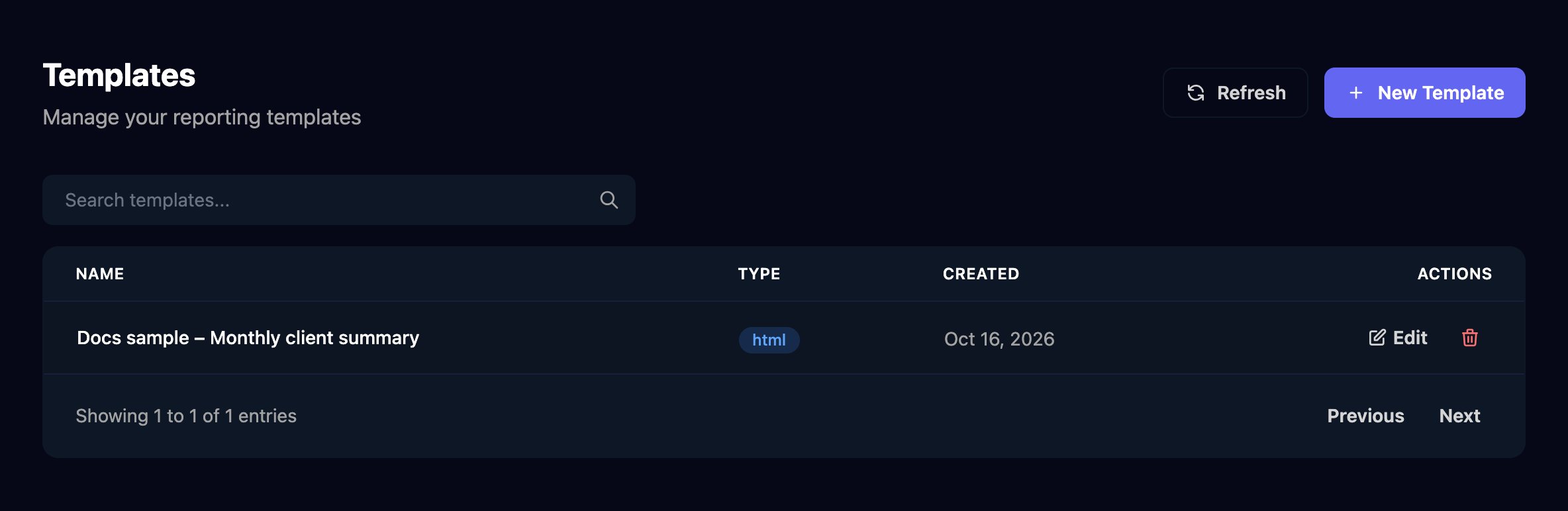
Reporting turns workflow data into a web page you can share with a client: a template sets the layout, and a workflow's Generate Report step fills it in. Anyone who can open Reporting, which includes [Admins and Approvers](/studio/clients/team-and-permissions#roles), can create and edit templates.

<Frame caption="Reports: designing a template, filling it from a workflow, then viewing and sharing the report (1:25).">
  <video controls preload="none" playsInline className="w-full aspect-video rounded-xl" poster="/images/videos/studio-reports.jpg" src="https://mintcdn.com/triggr/GxrCQFDFNLmEMyJ1/images/videos/studio-reports.mp4?fit=max&auto=format&n=GxrCQFDFNLmEMyJ1&q=85&s=b3f8d1ce919e67c63c9891896a7631a0" data-path="images/videos/studio-reports.mp4" />
</Frame>

<Frame>
  <img src="https://mintcdn.com/triggr/XztmSfsoAUpshfIO/images/studio/reporting/templates.png?fit=max&auto=format&n=XztmSfsoAUpshfIO&q=85&s=d72d53d7c4a26882d4c3b3ce623d8fae" alt="The Templates page, Manage your reporting templates, with Refresh and New Template buttons, a Search templates box and one template, Docs sample – Monthly client summary, type html, created Oct 16, 2026, with Edit and delete actions." width="2368" height="772" data-path="images/studio/reporting/templates.png" />
</Frame>

## Example: a monthly client summary

<Steps>
  <Step title="Create the template">
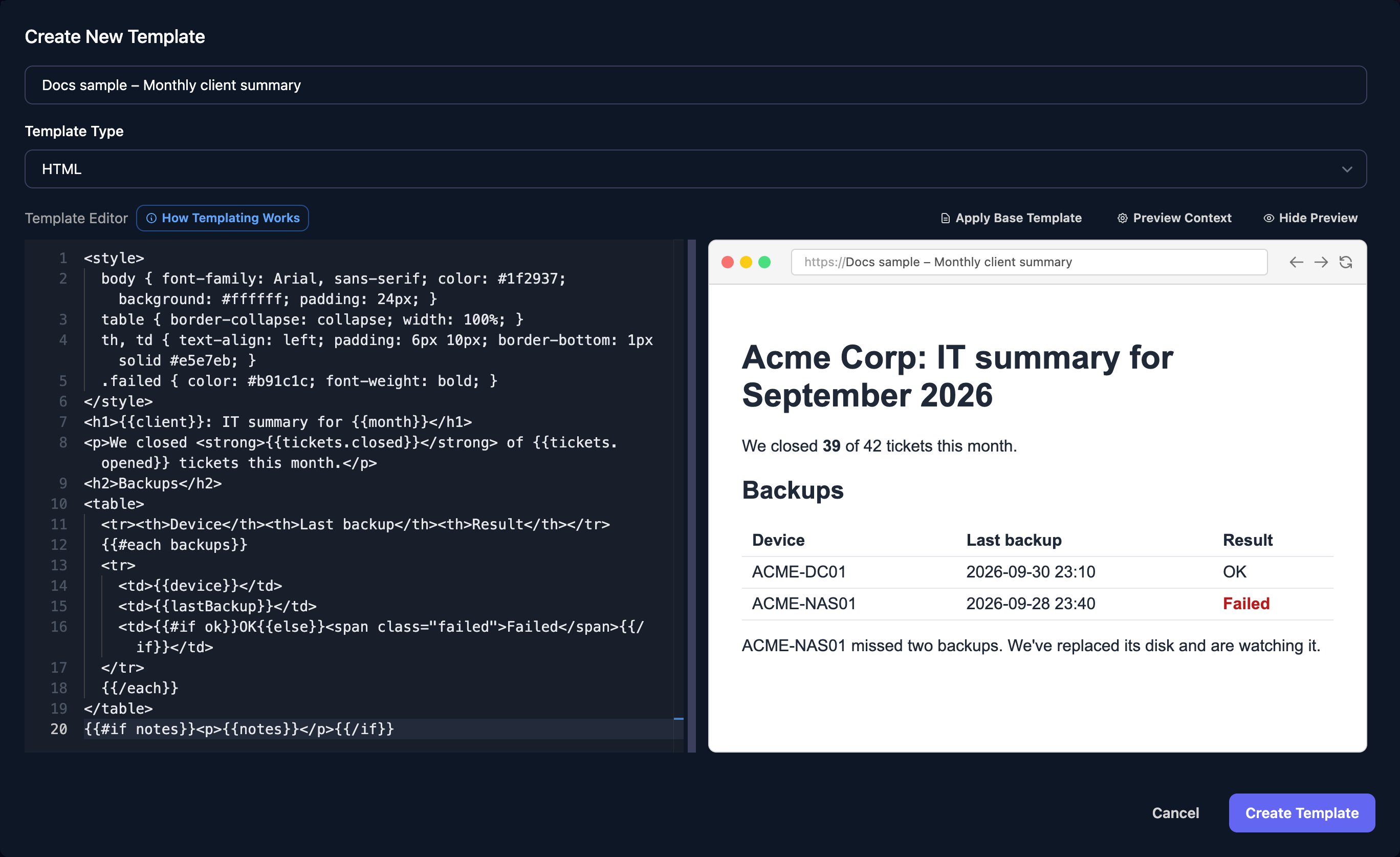
    Go to **Reporting > Templates**, click **New Template**, name it, keep the type on HTML and paste the template into the editor:

    ```handlebars theme={null}
    <style>
      body { font-family: Arial, sans-serif; color: #1f2937; background: #ffffff; padding: 24px; }
      table { border-collapse: collapse; width: 100%; }
      th, td { text-align: left; padding: 6px 10px; border-bottom: 1px solid #e5e7eb; }
      .failed { color: #b91c1c; font-weight: bold; }
    </style>
    <h1>{{client}}: IT summary for {{month}}</h1>
    <p>We closed <strong>{{tickets.closed}}</strong> of {{tickets.opened}} tickets this month.</p>
    <h2>Backups</h2>
    <table>
      <tr><th>Device</th><th>Last backup</th><th>Result</th></tr>
      {{#each backups}}
      <tr>
        <td>{{device}}</td>
        <td>{{lastBackup}}</td>
        <td>{{#if ok}}OK{{else}}<span class="failed">Failed</span>{{/if}}</td>
      </tr>
      {{/each}}
    </table>
    {{#if notes}}<p>{{notes}}</p>{{/if}}
    ```
  </Step>

  <Step title="Preview it with sample data">
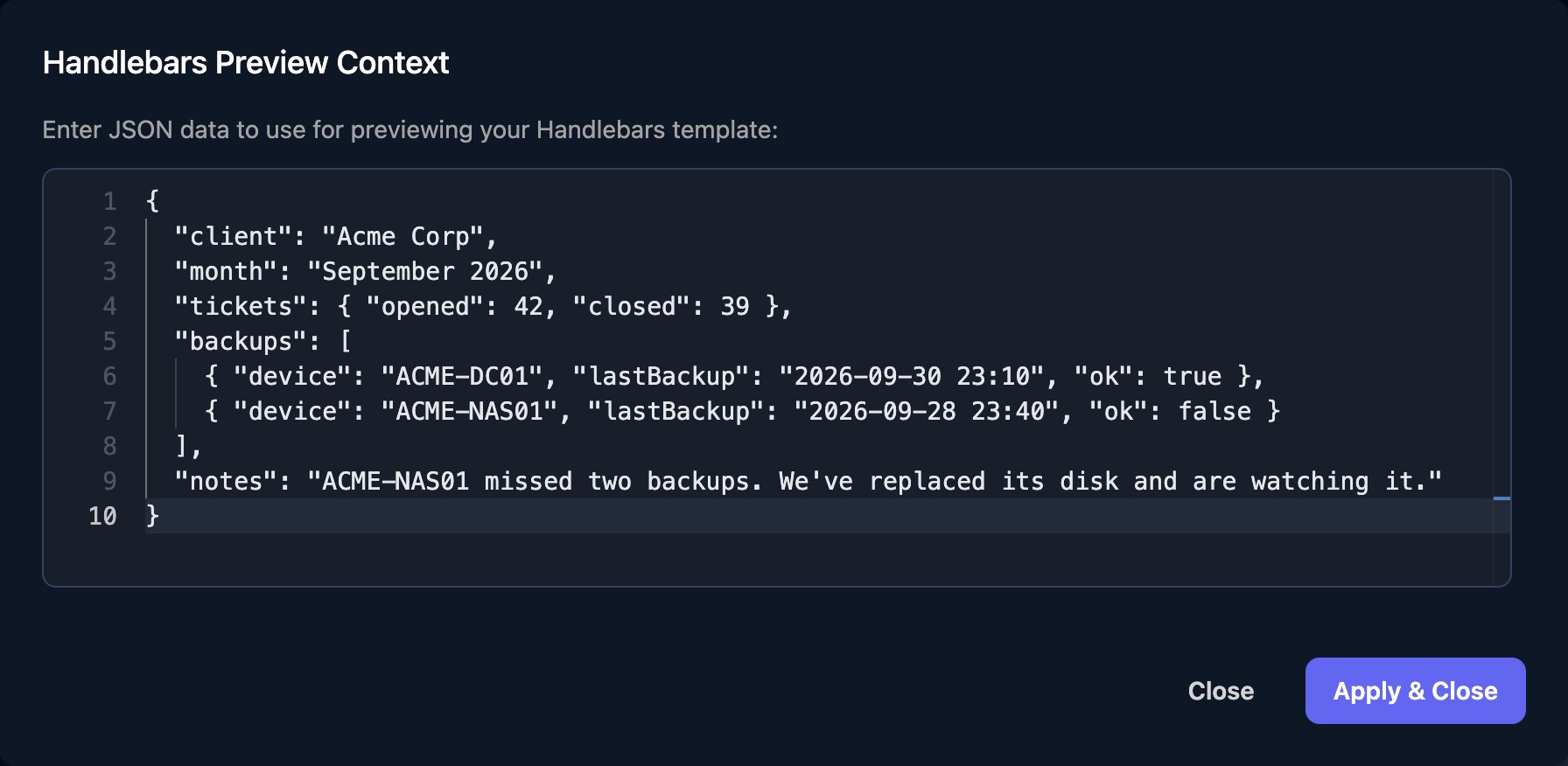
    Click **Preview Context**, paste data shaped like your workflow's and click **Apply & Close**.

    ```json theme={null}
    {
      "client": "Acme Corp",
      "month": "September 2026",
      "tickets": { "opened": 42, "closed": 39 },
      "backups": [
        { "device": "ACME-DC01", "lastBackup": "2026-09-30 23:10", "ok": true },
        { "device": "ACME-NAS01", "lastBackup": "2026-09-28 23:40", "ok": false }
      ],
      "notes": "ACME-NAS01 missed two backups. We've replaced its disk and are watching it."
    }
    ```

    <Frame>
      <img src="https://mintcdn.com/triggr/XztmSfsoAUpshfIO/images/studio/reporting/preview-context.png?fit=max&auto=format&n=XztmSfsoAUpshfIO&q=85&s=c32ab9ec595c8a99e81b841a2bb308d2" width="672" alt="The Handlebars Preview Context dialog, Enter JSON data to use for previewing your Handlebars template, containing the Acme Corp sample data, with Close and Apply & Close buttons." data-path="images/studio/reporting/preview-context.png" />
    </Frame>

    The preview beside the editor shows the result. Click **Create Template**.
    <Frame>
      <img src="https://mintcdn.com/triggr/XztmSfsoAUpshfIO/images/studio/reporting/template-editor.png?fit=max&auto=format&n=XztmSfsoAUpshfIO&q=85&s=51c8be89f3cfe3ffca7bb711210b5795" alt="The Create New Template dialog: name Docs sample – Monthly client summary, Template Type HTML, the template in the Template Editor with How Templating Works, Apply Base Template, Preview Context and Hide Preview above it, and a preview showing Acme Corp: IT summary for September 2026 with a backups table where ACME-NAS01 is Failed in red." width="2736" height="1674" data-path="images/studio/reporting/template-editor.png" />
    </Frame>
  </Step>

  <Step title="Generate it from a workflow">
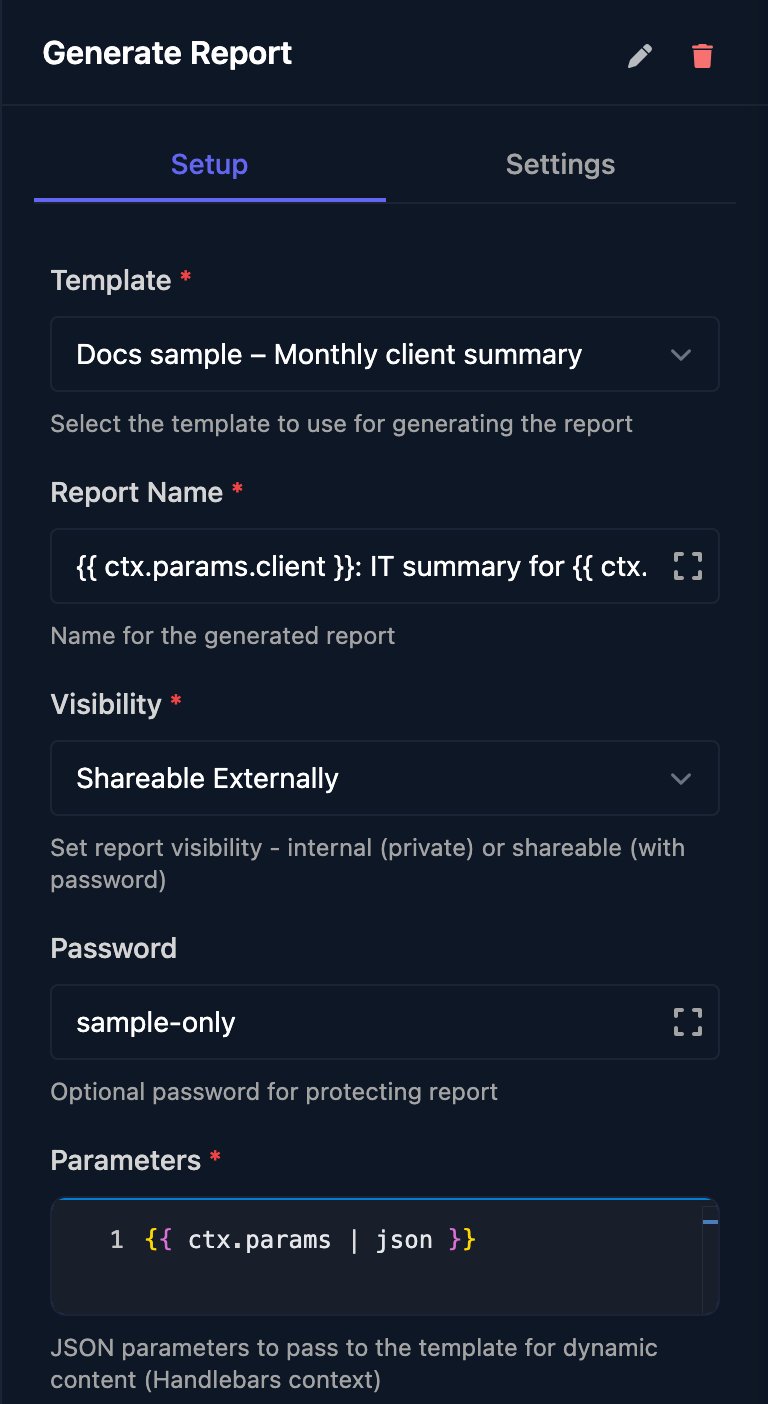
    Add **Generate Report** from Reporting, choose the template, enter a report name and put the data in Parameters; here `{{ ctx.params | json }}` passes everything the trigger received.

    <Frame>
      <img src="https://mintcdn.com/triggr/XztmSfsoAUpshfIO/images/studio/reporting/generate-report-step.png?fit=max&auto=format&n=XztmSfsoAUpshfIO&q=85&s=dde9d9e63f69aa32ecd127b4b4941006" width="384" alt="The Generate Report step: Template Docs sample – Monthly client summary, Report Name built from ctx.params.client and month, Visibility Shareable Externally, Password sample-only and Parameters ctx.params with the json filter." data-path="images/studio/reporting/generate-report-step.png" />
    </Frame>

    Visibility is Internal Only (your team, in Studio) or Shareable Externally (a public link), with an optional password; neither can change once the report exists.
  </Step>

  <Step title="Test it">
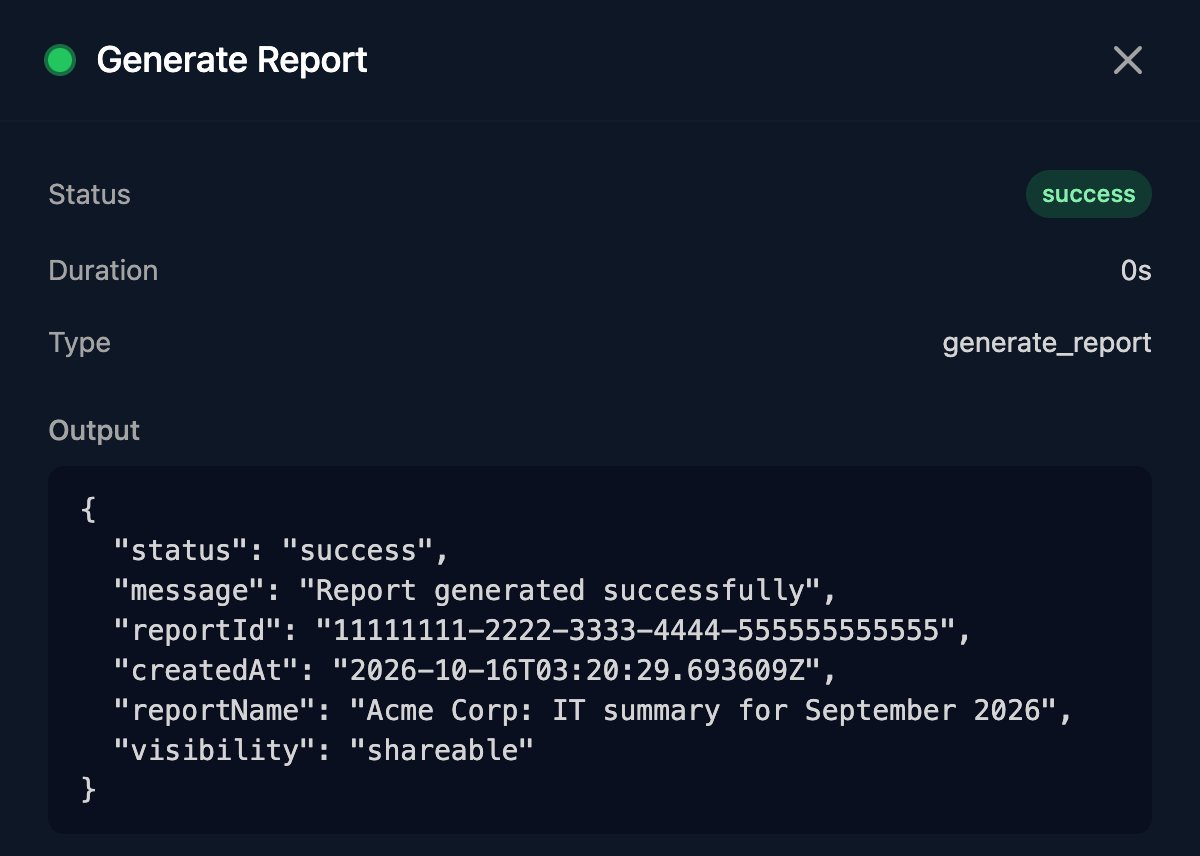
    Save, click **Manual Trigger** and enter the sample data from step 2. The output has the new report's `reportId`.

    <Frame>
      <img src="https://mintcdn.com/triggr/XztmSfsoAUpshfIO/images/studio/reporting/generate-report-output.png?fit=max&auto=format&n=XztmSfsoAUpshfIO&q=85&s=19bf95d5f1356dad51a7ac265002f85d" width="600" alt="The Generate Report step in a run: Status success, Type generate_report and Output with status success, message Report generated successfully, reportId, createdAt, reportName Acme Corp: IT summary for September 2026 and visibility shareable." data-path="images/studio/reporting/generate-report-output.png" />
    </Frame>
  </Step>
</Steps>

In a real workflow, fill Parameters from earlier steps, such as a ticket count from your PSA and backup results from your backup tool, and run it on the 1st of each month with a [Cron trigger](/studio/workflows/triggers#cron) such as `0 7 1 * *`.

## Template syntax

Templates use [Handlebars](https://handlebarsjs.com/guide/) and see exactly the JSON object in Parameters.

| Write | To |
| - | - |
| `{{client}}`, `{{tickets.closed}}` | Insert a value, made safe for HTML |
| `{{{notesHtml}}}` | Insert a value as HTML, unchanged |
| `{{#each backups}}…{{/each}}` | Repeat for each item: `{{device}}` is the item's field, `{{this}}` the item, `{{@index}}` its position |
| `{{#if ok}}…{{else}}…{{/if}}` | Show one part or the other; `{{#unless}}` is the opposite |
| `{{#with tickets}}{{closed}}{{/with}}` | Read fields of one object |

Do sums and date formatting in a Code step before Generate Report and pass the results in Parameters. A Markdown template is filled the same way, then turned into HTML.

## Reports

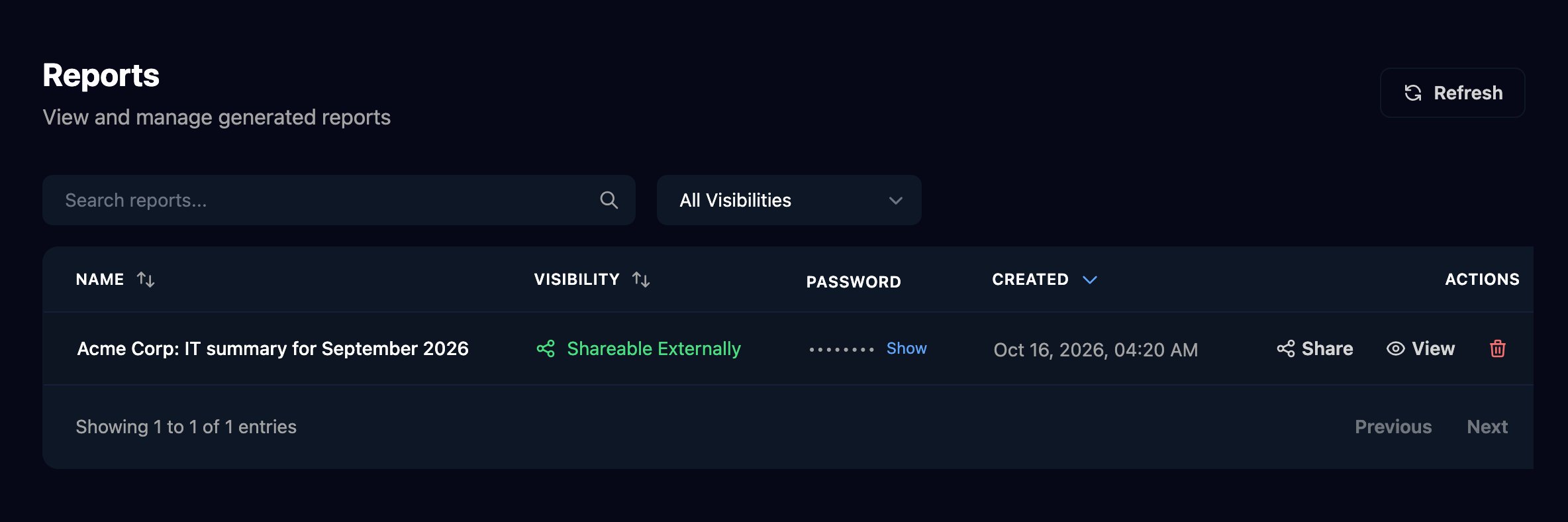
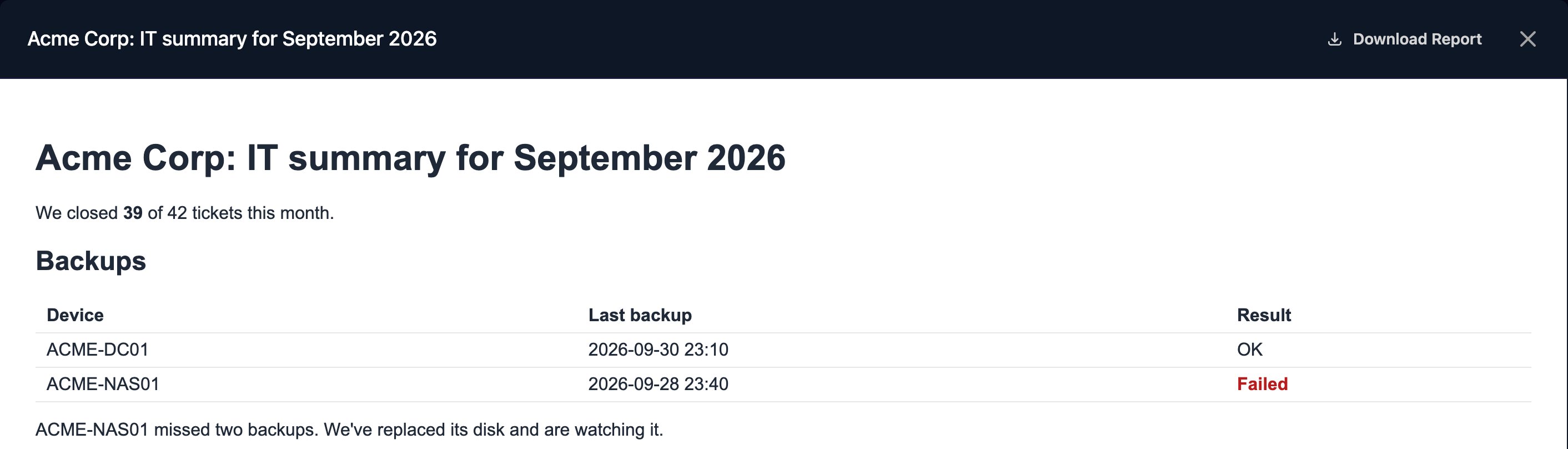
Reporting > Reports lists every generated report. Click **View** to open one; Download Report saves it as an HTML file, and Show in the Password column reveals a shareable report's password.

<Frame>
  <img src="https://mintcdn.com/triggr/XztmSfsoAUpshfIO/images/studio/reporting/reports.png?fit=max&auto=format&n=XztmSfsoAUpshfIO&q=85&s=8df6d15a5f1eb6aa5694aefab40c6789" alt="The Reports page, View and manage generated reports, with Search reports, an All Visibilities filter and one report, Acme Corp: IT summary for September 2026, Shareable Externally, a hidden password with Show, the created date, and Share, View and delete actions." width="2368" height="788" data-path="images/studio/reporting/reports.png" />
</Frame>

<Frame>
  <img src="https://mintcdn.com/triggr/XztmSfsoAUpshfIO/images/studio/reporting/view-report.png?fit=max&auto=format&n=XztmSfsoAUpshfIO&q=85&s=6bf7af9fcdecc99d3e1a197d7f7373a1" alt="A report open from View, titled Acme Corp: IT summary for September 2026 with a Download Report button, showing the tickets sentence, the backups table and the notes line." width="2824" height="808" data-path="images/studio/reporting/view-report.png" />
</Frame>

### Share a report

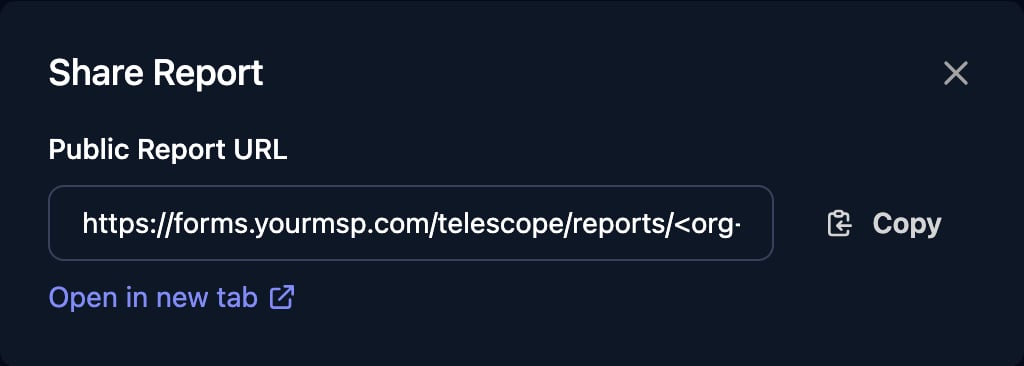
Click **Share** on a shareable report and copy the link. It uses your custom forms domain if you have one ([Branding](/studio/settings/branding-and-portal)).
<Frame>
  <img src="https://mintcdn.com/triggr/XztmSfsoAUpshfIO/images/studio/reporting/share-report.png?fit=max&auto=format&n=XztmSfsoAUpshfIO&q=85&s=7784e7bd613a563a4439a865d72e9285" width="512" alt="The Share Report dialog with a Public Report URL starting https://forms.yourmsp.com/telescope/reports/, a Copy button and Open in new tab." data-path="images/studio/reporting/share-report.png" />
</Frame>

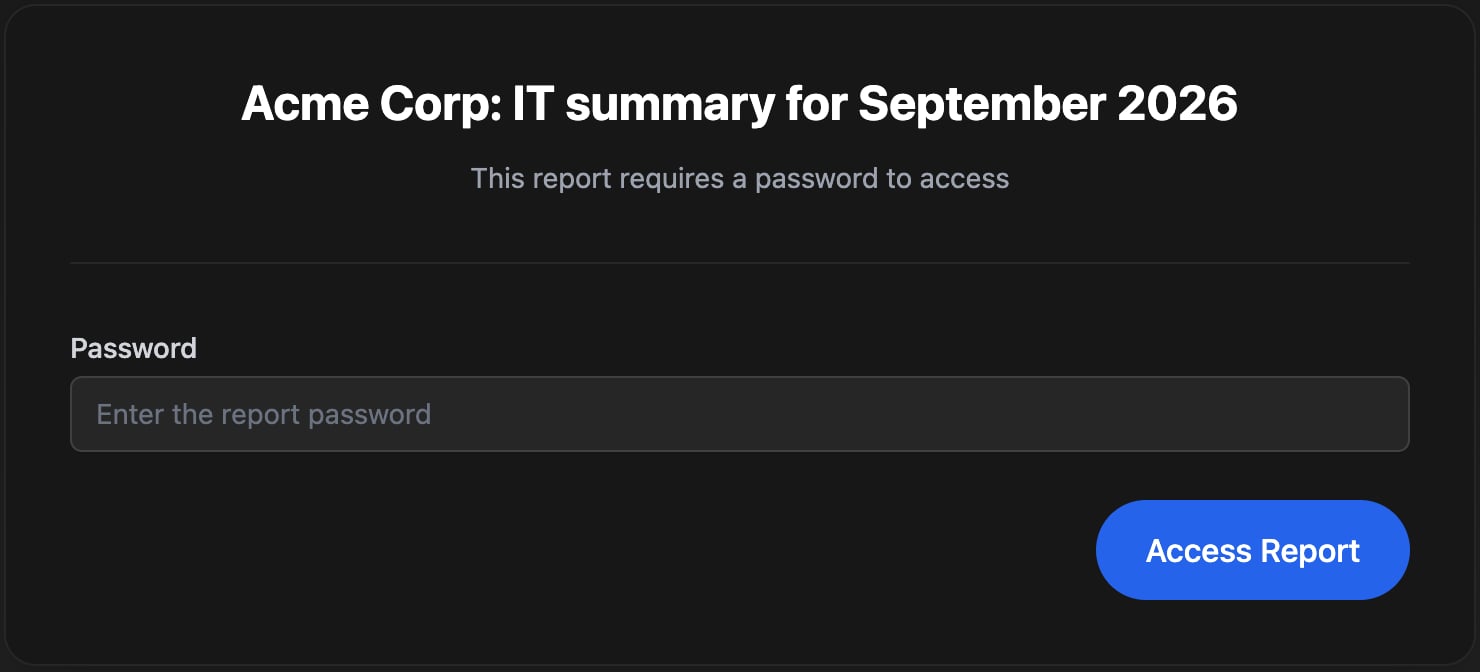
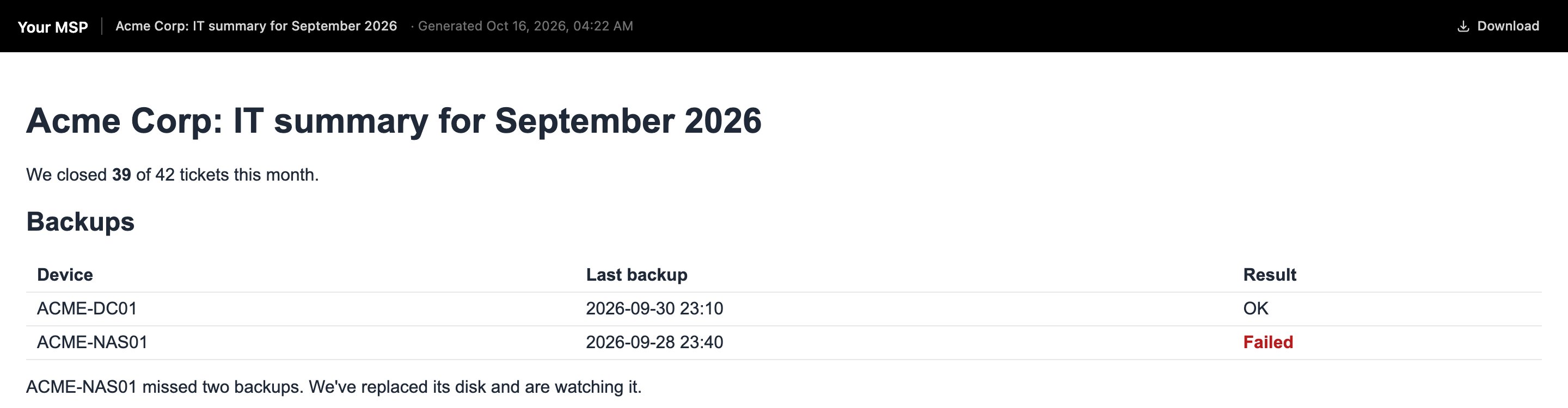
Recipients enter the password, if there is one, then see the report under your Dark Mode Logo, or your display name if you haven't uploaded one:
<Frame>
  <img src="https://mintcdn.com/triggr/XztmSfsoAUpshfIO/images/studio/reporting/public-report-password.png?fit=max&auto=format&n=XztmSfsoAUpshfIO&q=85&s=42b59128eba7915eda01beb125dea671" width="740" alt="A public report page for Acme Corp: IT summary for September 2026 saying This report requires a password to access, with a Password box and an Access Report button." data-path="images/studio/reporting/public-report-password.png" />
</Frame>

<Frame>
  <img src="https://mintcdn.com/triggr/XztmSfsoAUpshfIO/images/studio/reporting/public-report.png?fit=max&auto=format&n=XztmSfsoAUpshfIO&q=85&s=ca43183ea413f79c270787a1b24a9bf1" alt="The public report with a black header showing Your MSP, the report name, the generated date and Download, above the Acme Corp summary." width="2880" height="750" data-path="images/studio/reporting/public-report.png" />
</Frame>

To email the link from the workflow, add a Send Email step after Generate Report with `https://forms.yourmsp.com/telescope/reports/<org-id>/{{ ctx.steps['Generate Report'].reportId }}`, using your forms domain (or `app.triggr-app.com`) and your organisation's ID from Support > Copy Org ID in the top bar. Send the password separately.

A report is a snapshot: editing the template changes only reports generated afterwards. To withdraw a report, delete it.

## FAQ

<AccordionGroup>
  <Accordion title="Can I make PDF reports?">
    Reports are web pages; recipients can download the page or print it to PDF from their browser.
  </Accordion>

  <Accordion title="Can the template read the client or today's date?">
    Only if you pass them in Parameters, such as `"client": "{{ ctx.client.name }}"`.
  </Accordion>

  <Accordion title="My report shows dark text on a dark background in Studio">
    Set a background colour in the template, as the example does with `background: #ffffff`.
  </Accordion>

  <Accordion title="Can an AI assistant build templates or reports?">
    Yes, through [MCP](/studio/mcp) with the Report Templates and Reports tools, such as `create_report_template` and `generate_report`.
  </Accordion>

  <Accordion title="I need slides rather than a page">
    Use [Decks](/studio/reporting/decks).
  </Accordion>
</AccordionGroup>

## Troubleshooting

<AccordionGroup>
  <Accordion title="“parameters must be valid JSON”">
    Parameters isn't a JSON object once its templates are filled in. Put quotes around text values, as in `"client": "{{ ctx.client.name }}"`, or use `| json`.
  </Accordion>

  <Accordion title="“failed to render HTML template: …” or “failed to render markdown template”">
    The template has a Handlebars mistake, such as an `{{#each}}` without `{{/each}}`. Check it with sample data in the template's preview.
  </Accordion>

  <Accordion title="“template not found or does not belong to the specified organization”">
    The step's template was deleted. Choose another in the step and save.
  </Accordion>

  <Accordion title="A value is blank in the report">
    The name in the template doesn't match Parameters: `{{tickets.closed}}` needs `"tickets": { "closed": … }`. Names are case-sensitive.
  </Accordion>

  <Accordion title="Share is missing on a report">
    The report is Internal Only. Generate it again with Visibility set to Shareable Externally.
  </Accordion>
</AccordionGroup>


This documentation is built and hosted on [Mintlify](https://mintlify.com), a developer documentation platform.