

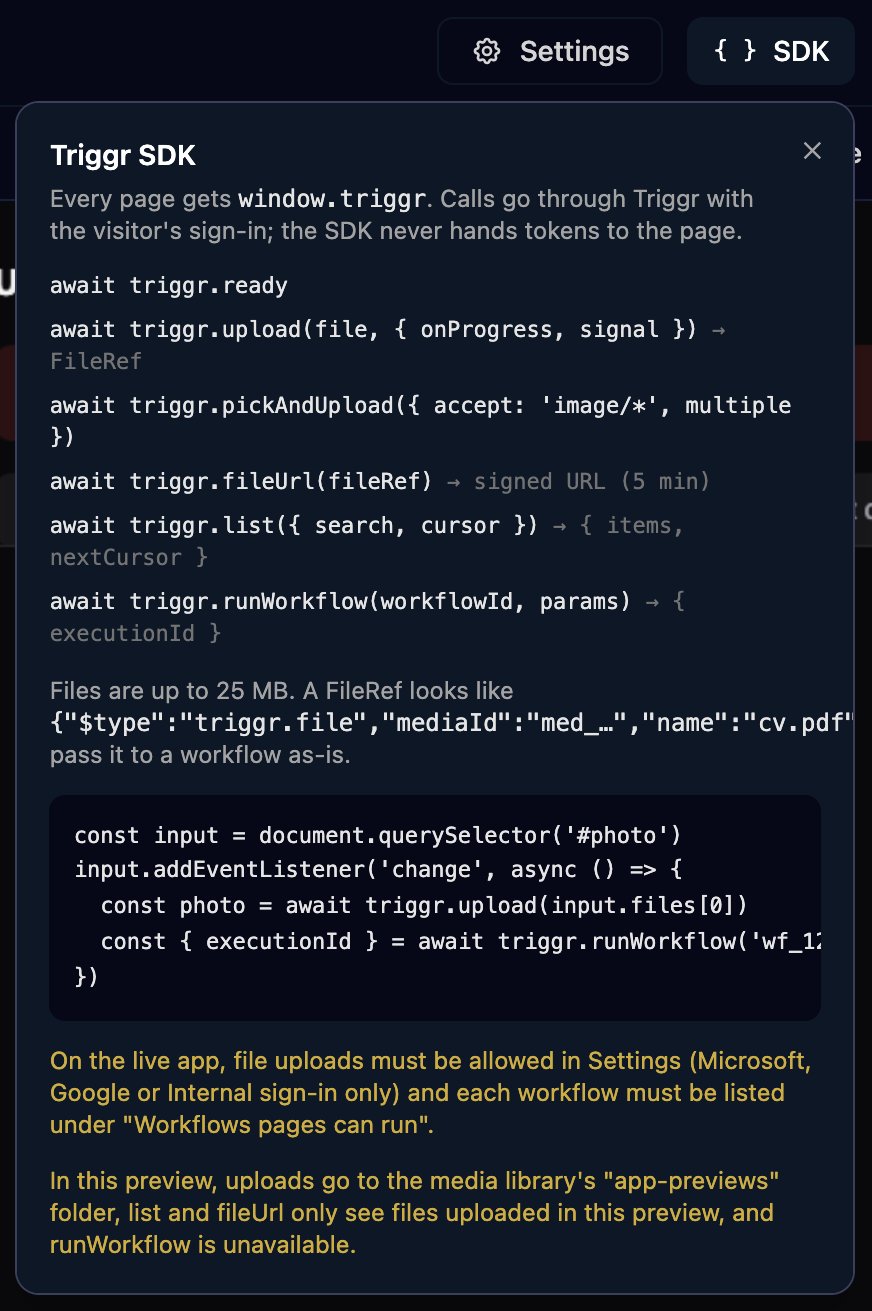
window.triggr, so don’t add a script tag for it. Calls go through Triggr as the signed-in visitor, and the SDK never hands the page a token or the app’s password. Click SDK in the editor for this list.
The internal app SDK: what a page can call, the settings that allow it, and a test in the live app (1:28).
No call reads a run’s result, your data or your clients; to show a result on a page, see Get results back.
Run a workflow
workflowIdis the ID in the workflow’s address in Studio:app.triggr-app.com/workflows/<id>/design.paramsis a plain object of up to 256 KB, with no single value over 64 KB, so send files as FileRefs. The workflow reads each value as{{ ctx.params.<name> }}.- It resolves as soon as the run is queued, with the run’s ID, not its result.
ctx.metadata.source (internal_app), ctx.metadata.appId and, on Microsoft, Google and Internal apps, ctx.metadata.appUser (email, name, id, authType, tenantId), so {{ ctx.metadata.appUser.email }} says who clicked. On Microsoft and Google apps it runs for the visitor’s client, so {{ ctx.client.name }} and client variables work without a Set Client step.
An app can run up to 50 workflows, and on apps that aren’t Internal each IP address can start 60 runs an hour.
Upload a file
fileis aFileorBlobof up to 25 MB (triggr.maxFileBytes): images, PDF, Office files, CSV and text, Outlook.msg, and common video and audio formats. SVG, HTML and executables are refused, and the extension must match the content.onProgressgets a number from 0 to 1;signaltakes anAbortSignalso the visitor can cancel;accepttakes file types as a string or a list.pickAndUploadresolves with a FileRef, or a list whenmultipleistrue, and withnull(or[]) if the visitor cancels. It uploads every chosen file at once, so a sixth fails withtoo_many_uploads.
runWorkflow as they are and use them wherever a step takes a file, such as Attachments on Send Email: {{ ctx.params.photo }}. Files are kept in Media and count towards your storage. On Microsoft and Google apps, each IP address can start 60 uploads an hour.
List and download files
itemsholds up to 50 files uploaded through this app, newest first, each a FileRef with acreatedAttime.searchmatches part of the name, ignoring case; for the next 50, passcursor: nextCursor(nullon the last page).- Your team sees every file uploaded through an Internal app; Microsoft and Google visitors see only their own client’s.
- A download link works for 5 minutes, so get a new one each time.
Test in the live app
SDK calls run in the live app only. The designer’s Preview and Open on Internal Apps (which kiosks and the post-login redirect also use) show a page’s layout, not its calls. To test a page, open the live app: Share > Open in new tab, or for an Internal apphttps://app.triggr-app.com/telescope/apps/<org-id>/<app-id> with your staff sign-in (Support > Copy Org ID in the top bar gives the first ID; the second is in the designer’s address bar).
triggr.ready resolves with { version, mode } once the page is connected: version is 1.2.0 and mode is app. You don’t have to wait for it.
Run a workflow from a page or a webhook
A workflow with a Webhook trigger can also be started from a page withfetch, but the two differ:
Use
runWorkflow for anything that changes something or acts for the visitor, and a webhook only to read data that’s safe for anyone to see.
Get results back
runWorkflow only returns the run’s ID. If someone needs to act on the result, have the workflow email, message or update a ticket. If the page needs to show it, add a separate read-only workflow with a Webhook trigger whose Finish Workflow Comment is the data as JSON, and call it with ?await=true:
runWorkflow, and a read-only webhook workflow that lists results from a database.
Errors
A failed call rejects with anError that has a code and a message:
FAQ
Can a page read a data table or my database?
Can a page read a data table or my database?
Not directly. Have a workflow read it with Execute SQL and return it through a read-only webhook, as in the uptime monitor.
Can a page tell who's signed in?
Can a page tell who's signed in?
On Microsoft and Google apps,
window.__TELESCOPE_USER__ holds the visitor’s email and name (Microsoft adds upn, preferredUsername and tenantId). Use it for display only. The workflow a page starts gets {{ ctx.metadata.appUser.email }} on Microsoft, Google and Internal apps.Why does the page say triggr is not defined?
Why does the page say triggr is not defined?
It was opened with Open on Internal Apps, which shows the page without the SDK. Open the live app instead, as in Test in the live app.
Can a page start any workflow if it knows the ID?
Can a page start any workflow if it knows the ID?
No.
runWorkflow only starts the workflows ticked under Workflows pages can run, up to 50 per app.