

{{ }} and Triggr fills it in when the step runs.
Insert a value
Get a step's output: find what a step returned, pick it into a later step and save it under a short name (1:28).
1
Pick a step or form field
Type 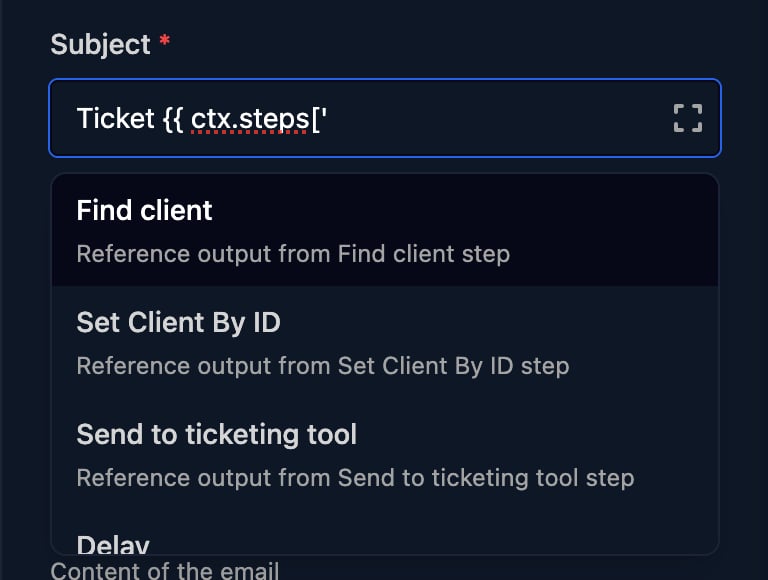
{{ ctx.steps[' to list the workflow’s steps and pick one that runs before this step, or {{ ctx.params. to pick a field of the trigger’s form.2
Add the field you want
The picker inserts the whole output,
{{ ctx.steps['Prepare details'] }}. Add the field before }}: {{ ctx.steps['Prepare details'].fullName }}. For a list, add the item’s position: {{ ctx.params.starters[0].firstName }}. A Group field’s sub-fields aren’t listed, so type them.Click away from the box when you’ve finished: Enter or Tab replaces the template with the suggestion. The list only appears in single-line fields; in Body, Comment and Code, type the path.3
Check the names in a test run
Click Manual Trigger, then a step in the run: its Output lists the fields you can read.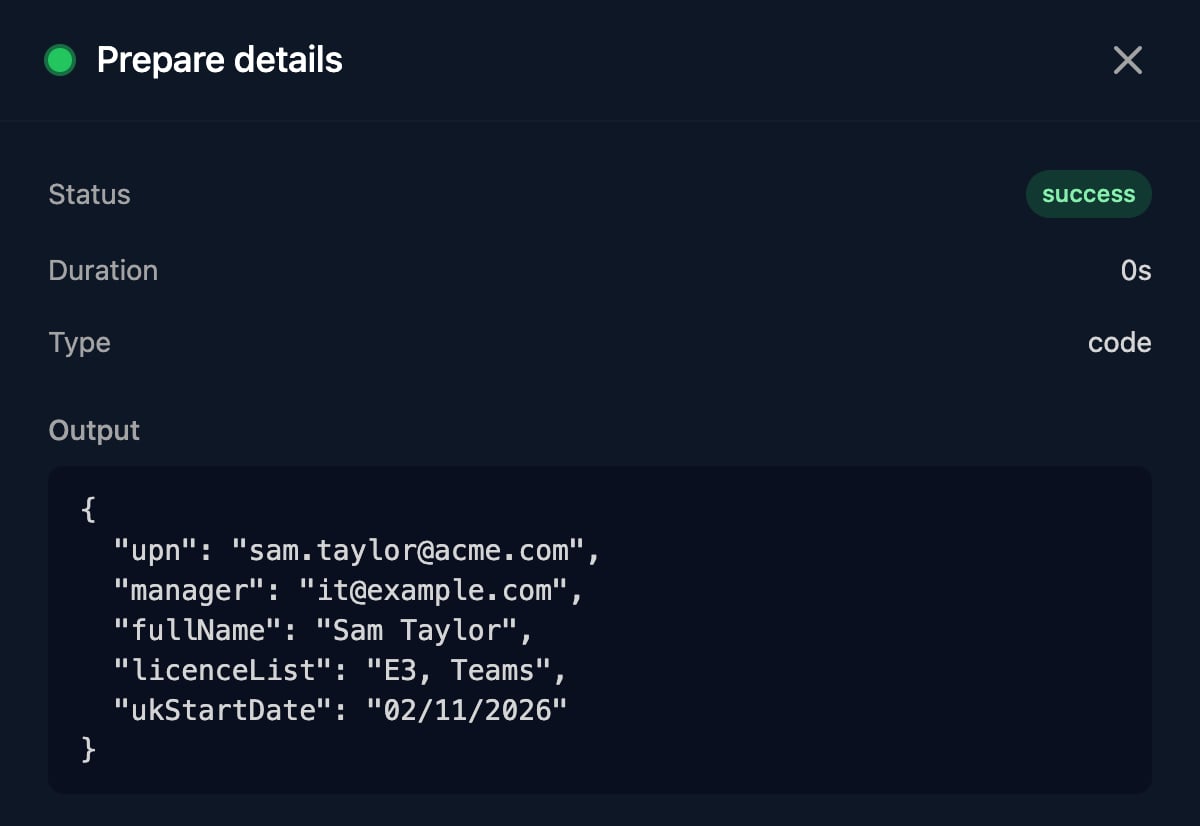
What you can read
What ctx is: what every step can read, and where to see it in a run (1:30).
To see what a step could read, run the workflow with Manual Trigger, click the step in the run and look at Context Before. Context After adds the step’s own output. Neither shows a For Loop’s current item.
Use
.name for simple names and ['Name'] for names with spaces or punctuation, such as step names. [0] picks the first item of a list: {{ ctx.steps['Find client'].clients[0].id }}. When you rename a step, update the steps that read it.
How templates fill in
With a trigger that sent{"firstName": "Sam", "lastName": "Taylor", "licences": ["E3", "Teams"], "notes": "Dell \"5440\" laptop"}:
- The result is always text: numbers and
true/falsebecome text, lists and objects become JSON, andnullbecomes nothing. | jsonis the only filter. It writes the value as JSON, adding quotes and escaping to text.- There are no defaults, maths or functions:
{{ ctx.params.a || 'x' }}and{{ ctx.params.name | upper }}fail. Use a Code step. - A path that doesn’t exist fails the step, as does anything between
{{and}}that isn’t actx.path, even inside an inserted value such as a form answer.
![A failed Finish Workflow step in a run: Status error, Duration 5s, and Output with error Template Error and message Missing or invalid variable: steps['Run child'].finishNodeOutput.comment.](https://mintcdn.com/triggr/rFRD51HB_88hTzdJ/images/studio/workflows/run-template-error.png?fit=max&auto=format&n=rFRD51HB_88hTzdJ&q=85&s=4104ef4d763f3e8b1ffa1afd226ec3bc)
Build JSON
Parameters in Trigger Workflow and Execute PowerShell, and a JSON Body in HTTP Request, are parsed as JSON after templates fill in. Put| json on values and leave out the quotes around them, so text with quotes or line breaks stays valid:
Conditions, loops and Code
A Condition set to Javascript, a For Loop’s Expression and a Code step run JavaScript, so they readctx directly without braces: ctx.params.department === 'Finance'.
Recipes
When a template isn’t enough, add a Code step (Data) andreturn an object. Later steps read its fields: {{ ctx.steps['Prepare details'].ukStartDate }}.
Shape data with Code: a Code step tidies form answers so later steps read short paths (1:29).
- Code reads
ctxdirectly. Whatever youreturnis the step’s output; returning nothing givesfalse. - A new Code step’s JavaScript box starts with three comment lines: replace them with your script.
- An error in the script fails the step. Check the step’s Output in a test run after each change.
- Don’t end the script with a
//comment line: the step then fails with a syntax error. - There’s no
console, no web requests and noawait. Use HTTP Request to call other systems.
Shape a list for later steps
A Group field sends a list, one object per entry. This Code step, Shape starters, turns each entry into what Create User needs:batch on its Settings tab, later steps read {{ ctx.batch.starters[0].upn }} (without one, {{ ctx.steps['Shape starters'].starters[0].upn }}). To act on every entry, loop over ctx.batch.starters with a For Loop and collect the results.
toLocaleDateString always gives US order, so split dates as above. Read ctx in Code rather than pasting {{ }} into it: a value containing a quote would break the script. Use .map, .filter and .find rather than the built-in _.map, _.filter and _.find, which can’t see your script’s own variables.
Collect results in a loop
A step inside a For Loop keeps only its latest pass. To keep every pass, end the Body with a Code step that adds to its own last output, then End For Loop.Collect results in a loop: a For Loop that builds up a list pass by pass, and a step after the loop that uses the whole list (1:29).
account) in a loop whose Variable Name is starter. On the first pass it has no output yet, so || [] starts an empty list; each pass returns the list one item longer. Steps on the On Completion path read the whole list, such as a Code step that counts it:
- When you save, Validation lists
STEP_REFERENCE_UNREACHABLE(“Step ‘Collect results’ is not reachable before this step executes”) for a step after the loop that reads it. The run isn’t affected. - Push into the list you return. A change to a list inside an object from
ctx, such asprev.lines.push(x), isn’t kept. - In the collector, read its own output as
ctx.steps['…'], not by a Context Variable Name, which Validation also flags. - Use one collector per loop. If the Body branches on a Condition, join the branches at the collector.
- Keep one For Loop per path. For a list inside each item, use Trigger Workflow with Await Completion and loop in the other workflow.
Save an output under a short name
On a step’s Settings tab, enter a Context Variable Name, one word such asdetails, to also save its output as ctx.<name>; later steps can then write {{ ctx.details.fullName }}.
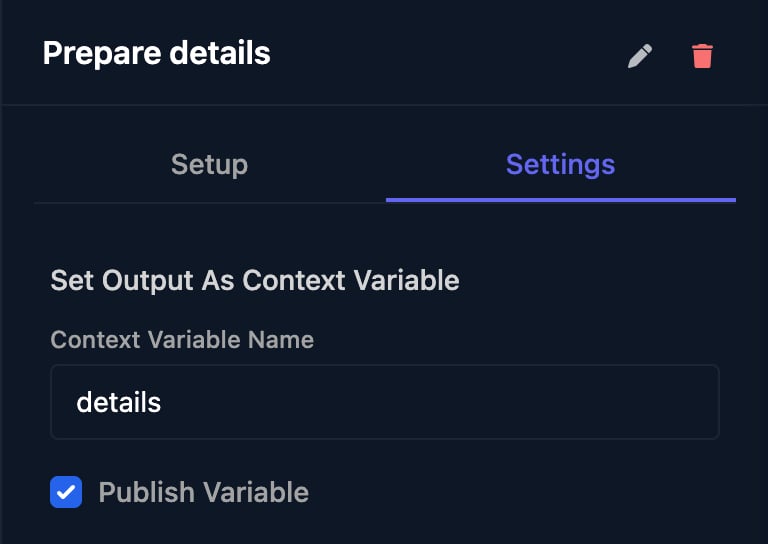
?await=true. Don’t use params, steps, client, org, metadata, ticket or publishedVariables: a reserved Context Variable Name is ignored, and a reserved loop Variable Name fails the run.
When a step fails
A failing step is tried once more after 5 seconds; if it fails again, the run stops as Failed. See Debug a failed run. To handle failures you expect:- HTTP Request and Generic Integration Action: tick Allow Non-2xx Status and branch on
statusorstatusCodewith a Condition. - Use the branching steps: Execute PowerShell (Timeout), Check Agents Online, Await Webhook and Check If Integrated.
- An awaited Trigger Workflow carries on when the other workflow fails, with
statusfailed. - End a path on purpose with Finish Workflow set to Fail.
- Trigger Workflow, Create Ticket, Log to Ticket, Add User to Group, Remove User from Group, Assign Licenses, Edit User and Revoke User Sessions accept
continueOnError, which outputssuccess: falseanderrorinstead of failing. The designer doesn’t show it; an AI tool connected through MCP can set it.
FAQ
“Missing or invalid variable: …”
“Missing or invalid variable: …”
The run has no value at that path. Check the spelling and capitals against the step’s Output, that the step ran on this path, and that it hasn’t been renamed.
“invalid params JSON” or “parameters must be valid JSON”
“invalid params JSON” or “parameters must be valid JSON”
Text pasted into JSON broke it. Use
"key": {{ value | json }} without quotes around the template.How do I set a default when a field is empty?
How do I set a default when a field is empty?
Add a Code step that returns
ctx.params.field || 'default' and read that.My Condition fails with “unknown parameter ctx.params”
My Condition fails with “unknown parameter ctx.params”
Condition Language is Triggr Lang, which reads
params.field without ctx.. Switch it to Javascript.Where do I store API keys for an HTTP Request?
Where do I store API keys for an HTTP Request?
Connect the tool as an integration and use Generic Integration Action. Org variables appear in every run’s details, so don’t keep secrets there.